Friday, September 5, 2025

My first ansible command execution on client node

 Ansible command execution from master node to client.

master node : ansiblemaster

remote user: shiva

client nodes:

1. node2.example.com

2. node1.example.com

Example 1. check ping pong test to client node which are part of inventory file.

shiva@ansiblemaster ansible]$ ansible -m ping dev,test

node2.example.com | SUCCESS => {

    "ansible_facts": {

        "discovered_interpreter_python": "/usr/bin/python3"

    },

    "changed": false,

    "ping": "pong"

}

node1.example.com | SUCCESS => {

    "ansible_facts": {

        "discovered_interpreter_python": "/usr/bin/python3"

    },

    "changed": false,

    "ping": "pong"

}


2.  Check hostname of client node which are pingable


3.Check xfs file system entry in fstab 


4. Check shiva user entry /etc/passwd

thanks.


Friday, October 13, 2023

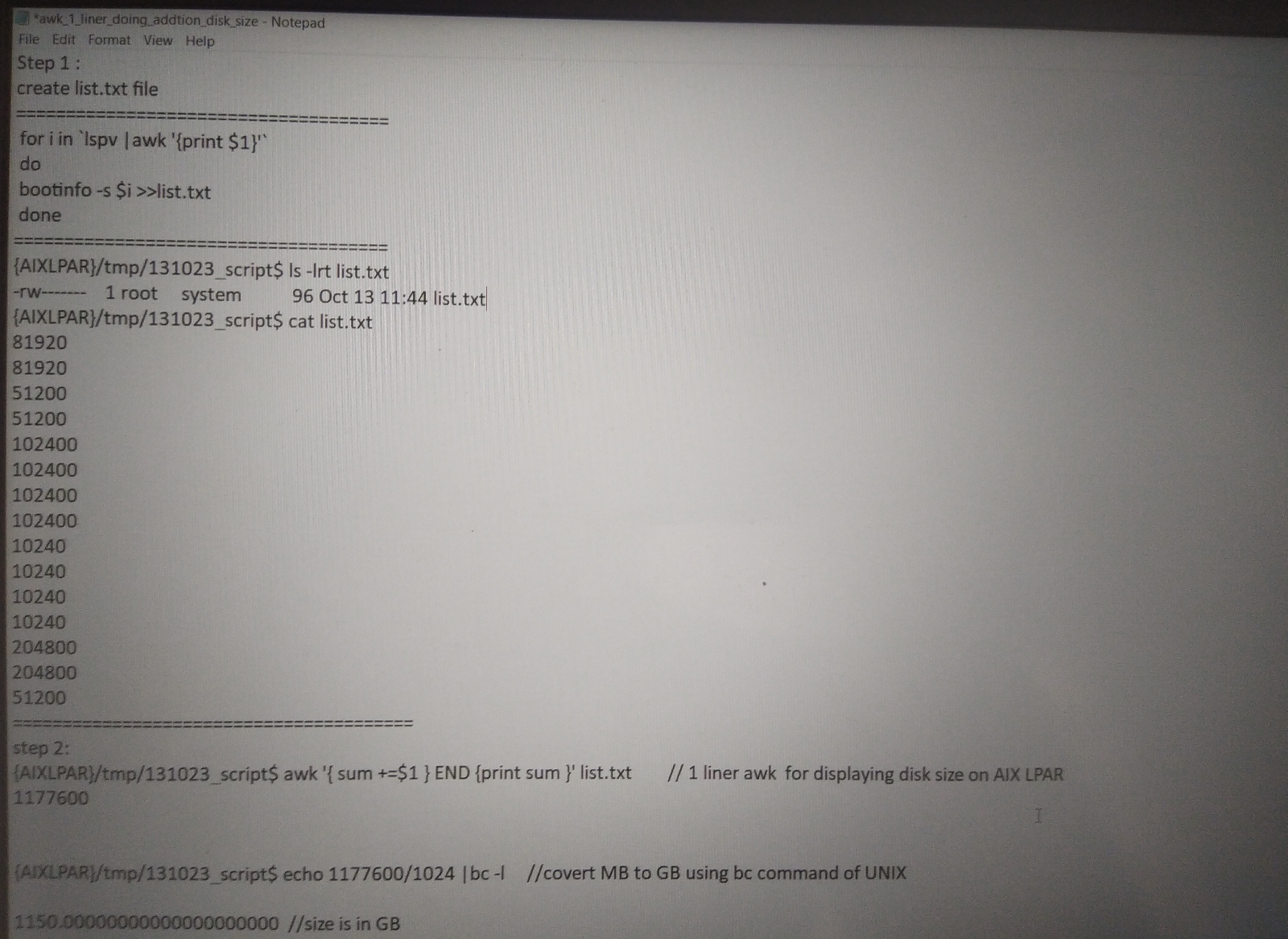
awk one line command for displaying total storage assigned on AIX LPAR


#awk '{ sum += $1 } END { print sum }' list.txt

list.txt.  file contain pv size in 1St column of file

Approach 2 for calculating storage size on AIX
====================================
Thanks : 😊

Friday, September 29, 2023

SAN disk path health check script using diff command UNIX

 SAN disk path health check script using diff command UNIX

Here following script will be helpful during SAN switch activity, where AIX admin involved for health check of disk before and after activity.

=============================================

step 1: create directory in /tmp  "health_check_disk"

#cd /tmp

#mkdir health_check_disk

Step 2:

create 2 file with following name

#cd /tmp/health_check_disk

#touch s1 s2

s1===>contain path information for all physical volume on AIX server

s2===>will contain path information for all physical volume on AIX LPAR.


step 3:

check content of s1 file

#cat s1

Enabled hdisk0 fscsi0

Enabled hdisk0 fscsi1

Enabled hdisk1 fscsi0

Enabled hdisk1 fscsi1

Enabled hdisk2 fscsi0

Enabled hdisk2 fscsi1

Enabled hdisk3 fscsi0

Enabled hdisk3 fscsi1


now we will see actual script how it create lspath data before SAN activity.

------------------------------------

for i in `lspv |awk '{print $1}'`

do

lspath -l $i >> s1        //Create s1 file with pv path information

done

----------------------------------

==========================

lspath data after SAN activity

----------------------------------

for i in `lspv |awk '{print $1}'`

do

lspath -l $i >> s2   Create s2 file with pv path information

done

----------------------------------

Now AIX admin need to perform "diff" command execution on both file

#diff s1 s2         // If this command return nothing then no paths is failed ,missing or defined state

#echo $?    //return 0 then no paths change happened both s1 and s2 file same

if above command return disk output with name path information then path is changed after AN activity so AIX admin need to correct those path using "chpath".


for example if after SAN team san switch migration some path got faulty then s2 file will contain following failed path

#cat s2

Enabled hdisk0 fscsi0

failed  hdisk0 fscsi1

Enabled hdisk1 fscsi0

failed  hdisk1 fscsi1

Enabled hdisk2 fscsi0

failed  hdisk2 fscsi1

Enabled hdisk3 fscsi0

failed hdisk3 fscsi1

When AIX admin run "diff" command on both file it will throw output with line number and file content. it also display what was content of s1 file and what difference now it having. so AIX admin easily identify those hdisk and correct their path

#diff s1 s2

Output:

It will show that s1 and s2 file has diffrence and show what was that diffrence

like hdisk0 fscsi1 path got failed and that was in enabled state before SAN team activity.


Thanks !!

Script to find stale physical partition on AIX LPAR

Find stale partition on AIX LPAR using following script

for i in `lsvg -o |awk '{print $1}'`
do
echo $i 
lsvg $i|grep -i "stale pps"
Sleep 2
done

Output: it will display stale pps if any, this script usefull for monitoring stale pps in volume group when there is VG sync in progress.

Thanks

Wednesday, September 27, 2023

/bin/rm: argument list too long

 /bin/rm: argument list too long

what is the solution to this error on UNIX or Linux???

solution:

When UNIX admin tries to delete too many files using rm command then he came across this error to address this error he can follow below solution

1.

find /tmp/logs -mtime +90  -exec -rm -f {} \;

above command will pass list of files older than 90 days to rm and it will remove those files

2.

find /tmp/logs -mtime +90  -print |xargs rm -f

it will also remove files older than 90 days

How to pass argumnet to xargs using n option to make sure it will delete n number of file

find /tmp/logs -mtime +90  -print |xargs -n 20 rm -f

it will delete/remove file in set of 20 .


Thanks


Dump device too small to store system dump ,warning message is AIX errpt

 Hello everyone, today i am writing about following error in AIX errpt

 Dump device too small to store system dump, warning message ?????

How AIX admin resolve this error and why its important to address this error.

dump device used to store memory image or it captures memory snap when AIX system crash, so that image is very much useful during analysis by Expert or finding main cause of the system crash.

Useful command on AIX system to get information about system dump device are following:

 know the potential size of the dump AIX would generate: 

#sysdumpdev -e

To change the primary dump device as sysdumpnull: 

#sysdumpdev -p /dev/sysdumpnull

To change the secondary dump device as sysdumpnull: 

#sysdumpdev -s /dev/sysdumpnull

To change the primary device permanently:  

#sysdumpdev -P -p <device_name>

To change the secondary device permanently: 

 #sysdumpdev -P -s <device_name>

To create the secondary dump device:

Command to create dump device in AIX using mklv command, make sure that volume group have sufficient space.

 #mklv -t sysdump -y <dumplv_name> <vg_name> <no of PPs> 

 #mklv -t sysdump -y lg_dumplv rootvg 6 hdisk0


Also AIX admin can create dump device using 

smitty mklv command=>create LV=>mention LV name,type as dump and number of pps


How to calculate AIX dump device size and create required size dump device??

check following image snap ,it having details

Once aix Admin confirmed size he can create dump lv and make it primary using above command 


Thanks !!!


mksysb backup failing with error /tmp/backupxxaaah8pqaa there is not enough space in file system

mksysb backup failing with error  /tmp/backupxxaaah8pqaa there is not enough space in file system

Solution:
Increaed /tmp by 1gb and performed health check of other file system like /, /home,/var ,/opt

Then executed vio backup and it's successful.


Thanks .

Monday, December 5, 2022

Boot AIX lpar from single user mode to multiuser

Boot a AIX lpar which was stuck in single user mode. AIX admin unable to access over network using ip address and cyyberark

Solution: Tried to access using nim jump server, putty and cyyberark but throwing network connection timeout, do decided to access from HMC console and found its stuck at single user mode.

Thanks!!!!
:)
Happy reading

LDAP user authentication issue on AIX LDAP client

Login issue for multiple LDAP users on AIX client server.

Hello all, 

Today I am going to discuss one incident where User on AIX server unable to switch to his home directory and when AIX admin tried to list user properties using lsuser command that command also not showing any details.


 #lsuser -R LDAP username 

Error message: 
3004-687 user abcd does not exist.

When did primary check found that this issue is on all LDAP client server.
 
Steps which AIX admin must perform to do troubleshooting are
  • Check whether NFS mounted LDAP mount point is mounted and healthy state . From this nfs mount point user home directory is accessible.
  • Make sure that slapd -server daemon and secldapclntd - Client Daemon active on LDAP server and LDAP client.
  • Also make sure that there is no CPU and memory bottleneck on this server.
✓checked and verify LDAP demon working on AIX LDAP server and client.using following command
.
#ps -eaf |grep -i slapd
#ps -eaf |grep -i secldapclntd
#ps -eaf |grep -i LDAP 

AIX LDAP  Server Daemon : slapd
 runs in LDAP server, processes the requests from LDAP client server

 #lsuser -R LDAP username // to disply LDAP user information 
secldapclntd - Client Daemon 

In case restart of client LDAP daemon need that achieved by using command:
# /usr/sbin/restart-secldapclntd

Below command will display ldapsever which is currently active.
#ls-secldapclntd
#ps -eaf |grep -i LDAP this will show running daemon process on AIX LDAP client and server.

Second thing which tried to verify is log file of LDAP on AIX LDAP server, here is the main breakthrough/clue we got.also we engaged database team and they saying that authentication denied error they getting when they tried to login, this information was sufficient to move towards solution. Also from AIX side IBM software support suggested to reset ldapdb2 user password.

Problem is ldapdb2 password was expired and that causing LDAP client requests are rejected.
Log file path for LDAP server where found ldapdb2 password expired 
----------------------------------
"db2cli.log" had following error message
"Sql30082N security processing failed with reason 1 password expired sqlstate=08001"


Also for this we got software support and they suggested to run command to reset password of ldapdb2 user.
Command for password reset on AIX ldap server
----------------------------------
#idscfgdb -l ldapdb2 -w <new password>

Here make sure that ibm slapd must be stopped when AIX admin execute this command.


✓Executed following command and took reboot of AIX LDAP server.
idscfgdb -l ldapdb2 -w <new password>

Also here forgot one thing that when thus issue occurred during that time our AIX patching team did pathcing and our first doubt was this caused because of this pathching, but main culprit was ldapdb2 password was expired. After password reset and AIX LDAP server reboot all AIX LDAP client able to access their home directory and switch to their account 


At the end we can conclude that there are following possible reasons for error "3004-687 user does not exist on LDAP client
1 check secldapclntd is active and running on AIX client.
2 Check whether NFS mounted LDAP mount point is mounted and healthy state
slapd
 runs in LDAP server, processes the requests from LDAP client server. Make sure it's active
4.Last important is ldapdb2 user password is not expired

Useful command while troubleshooting LDAP issue on AIX

#lsuser -R LDAP username 

#idscfgdb -l ldapdb2 -w <new password>.      Reset ldapdb2 password 

#ps -eaf |grep -i LDAP.       Display running LDAP process

# /usr/sbin/restart-secldapclntd.       Restart LDAP client demon

# /usr/sbin/start-secldapclntd    start LDAP client demon

# /usr/sbin/stop-secldapclntd          stop LDAP client demon


Thanks  :)
Happy Reading !!!!

Sunday, December 4, 2022

VCS freeze and unfreeze on AIX

VCS freeze and unfreeze on AIX
Thanks 
:)

Resource group switch and online and offline on AIX VCS cluster

Resource group switch and online and offline on AIX VCS cluster

Helpful command hagrp, hastatus.
Command usefull during DR .
Thanks
:)

Saturday, December 3, 2022

AIX HACMP script to monitor cluster resource group health

Shell script to monitor AIX cluster health

while true
do
clrginfo
lssrc -ls clstrmgrES |grep -i state
Sleep 5
done

It show RG status and cluster is in stable or not.

Thanks !!!
:)

How to access LPAR from HMC console

How To access AIX LPAR VIO inside power server frame using HMC command line console.

1.Login to HMC using IP address or FQDN
2. Enter following command

#vtmenu
1.powerframe1
2.powerframe2
3.powerframe3


This command will display all POWER frame connected to this HMC, enter number of a frame which you wanted to access.

3. if AIX admin wanted to see list of AIX LPAR and VIO inside powerframe6, he must enter number 6

output:

hscroot@hmc> vtmenu
 Retrieving name of managed system(s) . . . 

 ----------------------------------------------------------
  Managed Systems:
 ----------------------------------------------------------
1)powerframe1
2)powerframe2
3)powerframe3

 Enter Number of Managed System.   (q to quit): 1

 ----------------------------------------------------------
  Partitions On Managed System:  powerframe1
 ----------------------------------------------------------
   1)    lpar1                              Running
   2)    lpar2                              Running
   3)    lpar3                              Running
   4)    lpar4                              Running
   5)    lpar5                              Running

Enter user name : root
Enter password :XXXXXXXX

lpar1#

===============================================================

now AIX admin can access AIX LPAR using entering number. In this case AIX admin wanted to access
lpar1 so here he entered 1.

once entered AIX admin can login using root password.


AIX admin can exit from lpar1# console using following sequence of steps.
    
1.
lpar1# exit

once exited from # prompt,


IBM AIX LPAR 

login: ~.

Terminate session [y/n]: y


once AIX admin pressed yes it will exit AIX lpar1 session.

**AIX admin must press ~ first and then . to exit AIX lpar1 session.
~.  (tilt +dot)  //key combination

Thanks !!!!

:)


Add Alias IP address to AIX server ethernet interface using chdev command

 Hello All,

Today topic is Alias IP configuration on ethernet interface.

Scenario 1:

Alias IP configuration on en0 using chdev with permanent/temporary.


Command for assigning alias IP on en0 interface permanently is like following.

#chdev -l en0 -a alias4=192.168.0.100,255.255.255.0

This will add IP address 192.168.0.100 as Alias IP to en0 interface. AIX admin can verify this using command

#ifconfig -a 

Chdev command permanently set IP to interface en0. this alias IP address remain on AIX interface after reboot also.

    Let's consider scenario where AIX admin wanted to set IP address for temporary purpose, he can use following command 

#ifconfig en0 192.168.1.3 netmask 255.255.255.0 alias


Scenario 2:

If AIX admin wanted to remove that alias IP, how he can remove that??

Answer:

Remove a permanently added alias from an interface

chdev -l en0 -a delalias4=192.168.1.3,255.255.255.0


Another useful command for adding default route on AIX server

#route add default 192.168.1.1


Here I am sharing small script to check whether AIX server ethernet interface are pingable or not

============================================================

for i in `ifconfig -a |grep -i inet |awk '{print $2}'`

do

echo $i

ping -c 10  $i

done


Above script will ping to IP address assigned to interface, if they up and active will get ping response.


Thanks!!!!
:)


Friday, December 2, 2022

Execute AIX mksysb in background with nohup utility

 Hello All,

Today i am writing this blog to show how AIX Admin can Execute AIX mksysb backup using "nohup" utility and monitor logs using tail command.


                        AIX Mksysb                                 


This method is usefull to get logs of AIX mksysb backup command

#nohup mksysb -ieX /backup/Aixlpar.mksysb &

Above command will generate 1 process id and run this command in background, also create nohup.out file,where all logs for above command will logged. If above mksysb backup command fails,AIX admin can review nohup.out file and take correct action to solve issue.


Command to monitor logs in "nohup.out"   // nohup.out will genrate in same path from where AIX admin executed mksysb command.

#tail -f nohup.out

Some other useful command for taking AIX server mksysb backup are :

Create a mksysb backup of the rootvg volume group

 #mksysb -i /mnt/Aixlpar.mksysb.`hostname`_`date +%m%d%y`

Above command will create backup with servername and time,date and year format.


Thanks !!!

:)


Friday, November 18, 2022

Script for enabling failed vscsi and fscsi path on AIX client .

 Hello All,


Today will share small script which tested and used for enabling failed path on AIX client LPAR.

sometime AIX admin needs to take reboot of VIO server for maintenance activity, when AIX admin reboot 1 VIO server out of 2 then 1 VSCSI or FSCSI path become failed. once VIO is up and active sometime AIX admin observe that after VIO up some path still in failed state. AIX admin can try following script to enable those path


Scenario: Script to enable only failed path


for s in `lspath |grep -i failed|awk '{print $2}'`

do

chpath -l $s -p `lspath -l $s |grep -i failed|awk '{print $3}'` -s Enabled

sleep 2

done


To confirm whether any path on VIO server is failed or not


#lspath |grep -i failed


Thanks  !!!


:)


Saturday, November 12, 2022

Run perfpmr on AIX to provide performance data from AIX server.

 Sometime AIX admin needs to provide AIX LPAR performance data to support for analysis,

this data generally required when there is performance issue on AIX LPAR.

========================================================


perfpmr data accurate and effective when AIX admin run during problem window or when problem exists.

IBM support provide script of perfpmr AIX admin must run script which is valid according to version of AIX operating system


steps to run perfpmr on AIX

-----------------------------------

step 1:

OBTAINING THE PACKAGE

          
           From the internet:

           ==================
           'ftp://ftp.software.ibm.com/aix/tools/perftools/perfpmr'


     configure "perfpmr" 1st time 


          once following file downloaded and placed on temporary location on AIX LPAR ,follow following procedure,
          'perf71.tar.Z'.

         login as root 


          create perf71 directory inside /tmp  and move tar file to that directory 

             # mkdir /tmp/perf71
             # cd /tmp/perf71


          c. extract the shell scripts out of the compressed
               tar file:

             # zcat /tmp/perf71.tar.Z | tar -xvf -


Step 2:

Create following directory

# mkdir /tmp/perfdata
# cd /tmp/perfdata

and run following script to start perfpmr and make sure that following script executed from "/tmp/perfdata" path only. if he execute in any other path all data will be collected there.

#nohup /tmp/perf71/perfpmr.sh 600 &


it will run command in background for 600 seconds, for 10 minutes

AIX Admin can monitor this by 

#tail -f nohup.out 


once from nohup.out AIX admin confirm that perfpmr completed ,admin can convert that directory to pax.gz by following command

#cd /tmp

#ls -ld perfdata

#pax -xpax -vw perfdata | gzip -c > pmr#.pax.gz


once file is genrated send that file to IBM support for analysis.


Thanks

.


split command Unix AIX

split command Unix AIX

AIX split command is useful when larg size "snap" file genrated and AIX admin unable to upload it on IBM ecurep portal because of file upload size restriction on company environment.

AIX admin can split file by using following command.

#split -b  size_of _file large_size_file_name

---size of file  ,  Here AIX admin mention 10th of the size of file, displayed by ls -l command
---large_size_file_name--- Mention file name which AIX admin wanted to split.


after above split command execution following 3 file will get generated,

xaa
xab
xac

AIX admin upload these files to ecurep portal.

this way AIX admin split large size file in 3 part and reduce size. this will help to bypass restriction of larg file upload


Thanks !!!!!

iptrace run on AIX client and server

 Execute IPtrace on AIX Server and client for IBM support.

===========================================


AIX NFS client command

#startsrc -s iptrace -a "-a -bd server IP /tmp/iptracefile.client.raw"

AIX NFS server command

#startsrc -s iptrace -a "-a -bd Client IP /tmp/iptracefile.client.raw"


When AIX admin run iptrace for certain time period ,admin can stop iptrace using following command

stopsrc -s iptrace // for stopping on client and server


Thanks


Saturday, October 22, 2022

Extended grep use and example on UNIX and AIX server

 How AIX and UNIX admin use extended grep with example.

----------------------------------------------------------------------------

AIX and UNIX

Lets observe following example where AIX admin wanted to check path of  storage disk.

#lspath |grep -w "hdisk2"

#lspath |grep -w "hdisk3"

#lspath |grep -w "hdisk4"

Instead of typing above single command for getting path details, AIX admin can use following extended grep.


#lspath |grep -E " hdisk2 |hdisk 3 |hdisk4"

above command will display path information for hdisk2 ,hdisk3 and hdisk4.


Thanks !!!!!